Tuesday, 10 July 2018

ADF: ADF Table clear Filter

ADF: ADF Table clear Filter


    public void resetFieldTableFilter()
        {
        try {
            FilterableQueryDescriptor queryDescriptor =
                (FilterableQueryDescriptor)this.getFieldTable().getFilterModel();
            if (queryDescriptor != null &&
                queryDescriptor.getFilterCriteria() != null) {
                queryDescriptor.getFilterCriteria().clear();
                this.getFieldTable().queueEvent(new QueryEvent(this.getFieldTable(),
                                                               queryDescriptor));
            }
        } catch (Exception e) {
            if (AppsLogger.isEnabled(AppsLogger.SEVERE)) {
                AppsLogger.write(this,
                                 "Exception in  resetFieldTableFilter :" +
                                 e.getMessage() + " ", AppsLogger.SEVERE);
            }
        }
        }


Tuesday, 3 July 2018

ADF : SkipValidation

ADF : SkipValidation


http://andrejusb.blogspot.com/2012/12/skip-validation-for-adf-required-tabs.html


1. Set Immediate = true property for both tabs:
2. Open page definition file and select root tag, Go to Properties window and search for SkipValidation property. Set SkipValidation to true:

Monday, 26 March 2018

ADF : Best tutorial links

ADF: How to check whether particular View Object’s data is modified or not

ADF: How to check whether particular View Object’s data is modified or not?

 Create following method in ViewImpl class of your view object.

public boolean isdirty()
{
boolean flag=false;
DepartmentsViewRowImpl crow =(DepartmentsViewRowImpl)this.getCurrentRow();
EntityImpl entity= crow.getDepartments();
byte state=entity.getEntityState();
if(state!=entity.STATUS_UNMODIFIED)
{
flag=true;
}
return flag;
}


http://adftutorials.com/keyword/custom-error-message


ADF: Custom Error Handler in Model layer

ADF: Custom Error Handler in Model layer


https://docs.oracle.com/cd/E14571_01/web.1111/b31974/web_adv.htm#ADFFD1398

http://adftutorials.com/adf-custom-error-handler-to-display-custom-message-to-user.html

In Model Project
------------------

Step1 : custom error handler that extends the DCErrorHandlerImpl class

    eg:
        public final class MyErrorMessageHandler extends DCErrorHandlerImpl {

                public String getDisplayMessage(BindingContext ctx, Exception ex) { 
                        String message=""; 
                         
                        if (ex instanceof oracle.jbo.ValidationException) { 

                                String msg = ex.getMessage(); 
                         
                                int i=msg.indexOf("JBO-25013");//When JBO-25013 Too many object match promary key exception occur. 
                         
                                if(i>0) 
                         
                                { 
                                     
                                    message= "Duplicate Employee Id Found."; 
                                     
                                } 
                         
                                message= getDisplayMessage(ctx,ex); 
                         
                        } 
                         
                        else             
                         
                        { 
                         
                            message=getDisplayMessage(ctx,ex); 
                         
                        } 
                         
                        return message;            
                         
                }                                                                                                                                                                 
 

In View Project
------------------

Step2 :  Register MyCustomErrorHandler class into Databinding.cpx file.


    <?xml version="1.0" encoding="UTF-8" ?> 
   
    <Application xmlns="http://xmlns.oracle.com/adfm/application" 
     
    version="11.1.1.60.13" id="DataBindings" SeparateXMLFiles="false" 
     
    Package="com.in.adftutorials.view" ClientType="Generic" 
     
    ErrorHandlerClass="com.in.adftutorials.view.MyCustomErrorHandler">

Wednesday, 28 June 2017

ADF : ADF Table not displaying rows 1st time.

ADF : ADF Table not displaying rows 1st time.


If we are using <af:quickQuery component against VO (ADF table), always we should mark "Query Automatically" checked, other wise rows will not be displayed 1st time when we land to the page.

Sunday, 23 April 2017

JavaScript: Read WebCam and take snap shot

JavaScript: Read WebCam and take snap shot


<html lang="en">
<head>
<meta charset="UTF-8">
<title>Document</title>

</head>
<body>
<video id="video"></video>
<canvas id="canvas"></canvas><br>
<button onclick="snap();">Snap</button>
<script type="text/javascript">
alert("coming11");
var video = document.getElementById('video');
var canvas = document.getElementById('canvas');
var context = canvas.getContext('2d');
alert("coming22");
navigator.getUserMedia = navigator.getUserMedia ||
navigator.webkidGetUserMedia ||
navigator.monzGetUserMedia ||
navigator.oGetUserMedia ||
navigator.msGetUserMedia;
alert("coming3");
if(navigator.getUserMedia){
navigator.getUserMedia({video:true}, streamWebCam, throwError);
}

function streamWebCam (stream) {
video.src = wendow.URL.createObjectURL(stream);
video.play();
}

function throwError (e){
alert(e.name);
}

function snap(){
canvas.width=video.clientWidth;
canvas.height=video.height;
canvas.drawImage(video,0,0);
}
</script>
</body>
</html>

https://www.youtube.com/watch?v=K_NP_a78Jpk

Webcam integrating with java code - http://webcam-capture.sarxos.pl/


Friday, 31 March 2017

ADF : REST and WebService

ADF : REST and WebService


RESTService


         https://www.youtube.com/watch?v=aEWqOMQ2a_c

Consuming REST application


        https://www.youtube.com/watch?v=1ujo8c-2UTo

#########################################################################################

WebService


           https://www.youtube.com/watch?v=Cos1qSn4EvU

Consuming WebService application


          https://www.youtube.com/watch?v=yDms-WIYoUw

Thursday, 23 March 2017

ADF : BC : Errors faced.

ADF : BC : Errors faced.

1. Missing bind parameter 1


         ObjectDetailsEO.IMPORT_OBJECT_ID = :Bind_ImportObjectId


2. ADF : BC : Fetch more than 500 Rows


3. JBO-25083: Cannot create a secondary iterator on row set ImportObjectsVO_ImportObjectDetails_ImportObjectsVOToImportObjectDetailsVo_ImportObjectDetailsVO_1 because the access mode is forward-only or range-paging


4. ViewObject -> Entity Usage -> Inner Join / Left outer join


Thursday, 19 January 2017

ADF : Serializable

ADF : Serializable


All the managed beans should be serializable because the container may occassionally serialize and passivate the beans or send it over the network. This occurs in situations 
such as heavy load (our case) or when clustering is enabled.

Another tip:

- The managed beans with pageFlow or session scope are required to be serialized while backingBean or request scope are not required to be serialized.

- The ADF/JSF Rich UI components are not serializable and hence they should not be present in pageFlow scope managed beans.

Response: Your pageFlowScope bean should implements Serializable.


Eg:


Possibility 1:


Possibility 2:


Possibility 3:


Possibility 4:


Report


By setting this in java option we will get to know the issues in diagnostic or em logs.

-Dorg.apache.myfaces.trinidad.CHECK_STATE_SERIALIZATION=all

check : http://hasamali.blogspot.in/2011/09/adf-jsf-adfc-scope-object-serialization.html


About - serialVersionUID


The serialVersionUID is used as a version control in a Serializable class. If you do not explicitly declare a serialVersionUID, JVM will do it for you automatically, based on various aspects of your Serializable class

Check - https://www.mkyong.com/java-best-practices/understand-the-serialversionuid/


How Server does Serialization and Deserialization

A simple way to write / serialize the UserBean object into a file – “c:\\UserBean.ser”.


FileOutputStream fout = new FileOutputStream("c:\\UserBean.ser");
ObjectOutputStream oos = new ObjectOutputStream(fout);
oos.writeObject(UserBean Obj);


A simple way to read / deserialize the UserBean object from file – “c:\\UserBean.ser”.


  FileInputStream fin = new FileInputStream("c:\\UserBean.ser");
  ObjectInputStream ois = new ObjectInputStream(fin);
  UserBean = (UserBean) ois.readObject();

Saturday, 17 December 2016

ADF : Treetable - SelectionListner and onLoad execution

ADF : Treetable - SelectionListner and onLoad execution


On Selection Listner – Store data into pageflowscope

    public void fileImpotObjectsTreeSelectionListener(SelectionEvent selectionEvent){
        ADFUtil.invokeEL("#{ApplicationsTreeBean.treeSelectionHandler}",
                         new Class[] { SelectionEvent.class },
                         new Object[] { selectionEvent });  
       
        CollectionModel treeModel =
          (CollectionModel) fileImpotObjectsTreeTable.getValue();
        RowKeySet rs = getFileImpotObjectsTreeTable().getSelectedRowKeys();
        RichTreeTable fileImpotObjectsTreeTable = this.getFileImpotObjectsTreeTable();
        Object oldKey = fileImpotObjectsTreeTable.getRowKey();
        Map attributeMap = new HashMap();
        if(rs != null){
            Iterator it = rs.iterator();
            if (it.hasNext()){
                List rowKey = (List) it.next();
                if (rowKey.size() > 0){
                    //Key k = (Key) rowKey.get(0);
                    //ADFUtil.setEL("#{pageFlowScope.selectedTerrKey}", k);
                    fileImpotObjectsTreeTable.setRowKey(treeModel.getRowKey());
                    JUCtrlHierNodeBinding rowData =
                      (JUCtrlHierNodeBinding) fileImpotObjectsTreeTable.getRowData();
                   
                    if (rowData != null) {
                        Row r = rowData.getRow();
                        ADFUtil.setEL("#{pageFlowScope.selectedObjectDetailId}", r.getAttribute("ObjectDetailId"));
                        attributeMap.put("alternatekey", r.getAttribute("AlternateKeys"));
                        attributeMap.put("mandatoryattr", r.getAttribute("MandatoryAttrs"));
                        attributeMap.put("mandatorygrpattr", r.getAttribute("MandatoryGroupAttrs"));
                        ADFUtil.setEL("#{pageFlowScope.attributeMap}", attributeMap);
                        ADFUtil.invokeEL("#{bindings.filterObjectAttributesByObjectDetail.execute}");
                        AdfFacesContext.getCurrentInstance().addPartialTarget(this.fileImpotObjectsAttributeTable);
                    }
                }
            }
        }
    }

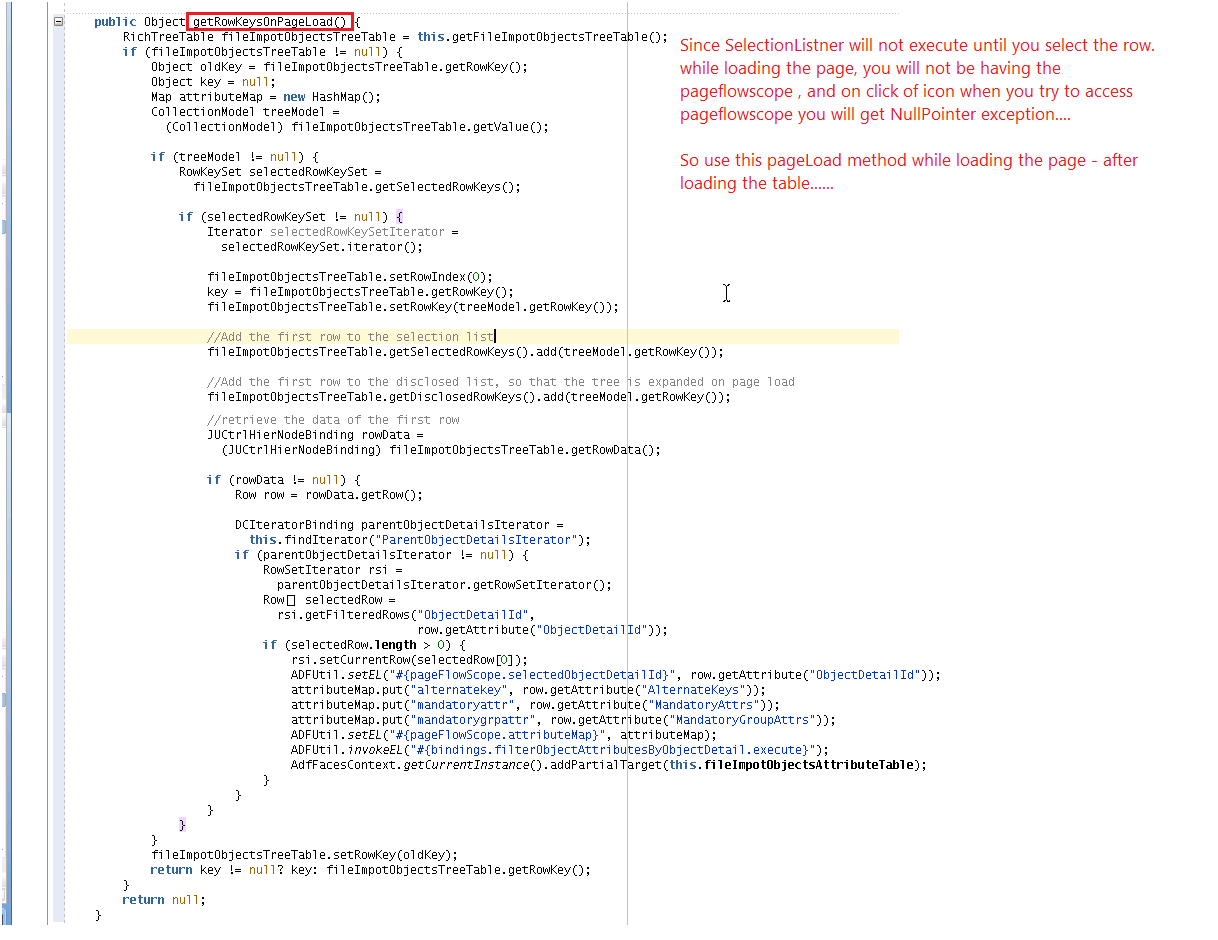
On Page load – Store data into pageflowscope
    public Object getRowKeysOnPageLoad() {
        RichTreeTable fileImpotObjectsTreeTable = this.getFileImpotObjectsTreeTable();
        if (fileImpotObjectsTreeTable != null) {
            Object oldKey = fileImpotObjectsTreeTable.getRowKey();
            Object key = null;
            Map attributeMap = new HashMap();
            CollectionModel treeModel =
              (CollectionModel) fileImpotObjectsTreeTable.getValue();
           
            if (treeModel != null) {
                RowKeySet selectedRowKeySet =
                  fileImpotObjectsTreeTable.getSelectedRowKeys();
               
                if (selectedRowKeySet != null) {
                    Iterator selectedRowKeySetIterator =
                      selectedRowKeySet.iterator();
                   
                    fileImpotObjectsTreeTable.setRowIndex(0);
                    key = fileImpotObjectsTreeTable.getRowKey();
                    fileImpotObjectsTreeTable.setRowKey(treeModel.getRowKey());
                   
                    //Add the first row to the selection list
                    fileImpotObjectsTreeTable.getSelectedRowKeys().add(treeModel.getRowKey());
                   
                    //Add the first row to the disclosed list, so that the tree is expanded on page load
                    fileImpotObjectsTreeTable.getDisclosedRowKeys().add(treeModel.getRowKey());
                   
                    //retrieve the data of the first row
                    JUCtrlHierNodeBinding rowData =
                      (JUCtrlHierNodeBinding) fileImpotObjectsTreeTable.getRowData();
                   
                    if (rowData != null) {
                        Row row = rowData.getRow();
                       
                        DCIteratorBinding parentObjectDetailsIterator =
                          this.findIterator("ParentObjectDetailsIterator");
                        if (parentObjectDetailsIterator != null) {
                            RowSetIterator rsi =
                              parentObjectDetailsIterator.getRowSetIterator();
                            Row[] selectedRow =
                              rsi.getFilteredRows("ObjectDetailId",
                                                  row.getAttribute("ObjectDetailId"));
                            if (selectedRow.length > 0) {
                                rsi.setCurrentRow(selectedRow[0]);
                                ADFUtil.setEL("#{pageFlowScope.selectedObjectDetailId}", row.getAttribute("ObjectDetailId"));
                                attributeMap.put("alternatekey", row.getAttribute("AlternateKeys"));
                                attributeMap.put("mandatoryattr", row.getAttribute("MandatoryAttrs"));
                                attributeMap.put("mandatorygrpattr", row.getAttribute("MandatoryGroupAttrs"));
                                ADFUtil.setEL("#{pageFlowScope.attributeMap}", attributeMap);
                                ADFUtil.invokeEL("#{bindings.filterObjectAttributesByObjectDetail.execute}");
                                AdfFacesContext.getCurrentInstance().addPartialTarget(this.fileImpotObjectsAttributeTable);
                            }
                        }
                    }
                }
            }
            fileImpotObjectsTreeTable.setRowKey(oldKey);
            return key != null? key: fileImpotObjectsTreeTable.getRowKey();
        }
        return null;
    }

Reuse Stored data from pageflowscope

public void loadTableList(ActionEvent actionEvent) {
        List<FileImportValidationMessage> thisValidationMessageList =
            (List<FileImportValidationMessage>)ADFUtil.evaluateEL("#{pageFlowScope.keyTableList}");

        if (thisValidationMessageList != null) {
                    Object alternateKey = resolvElDC("#{row.TaskDetails14}");
                    if(alternateKey != null && !"".equalsIgnoreCase(alternateKey.toString())){
       
                        FileImportValidationMessage fileImportValidationMessage = null;
                        List<FileImportValidationMessage> keyTableList = new ArrayList<FileImportValidationMessage>();
                            String alternamteKeyStr = alternateKey.toString();
                            String keys[] = alternamteKeyStr.split("|");
                            Integer count = 1;
                            for(int i = 0; i < keys.length; i++) {
                               
                                fileImportValidationMessage = new FileImportValidationMessage(count.toString(),keys[i]);
                                keyTableList.add(fileImportValidationMessage);
                               
                            }
                            this.keyTableList = keyTableList;
                            ADFUtil.setEL("#{pageFlowScope.keyTableList}", keyTableList);
                    }
            }
               
    }

JSFF code

<af:treeTable   value="#{bindings.ParentObjectDetails1.treeModel}"
                                            var="node" rowSelection="single"
                                            selectionListener="#{backingBeanScope.FileImportManageImportObjects.fileImpotObjectsTreeSelectionListener}"
                                            id="ATTt1" initiallyExpanded="true" expandAllEnabled="true" autoHeightRows="10"
                                            displayRowKey="#{backingBeanScope.FileImportManageImportObjects.rowKeysOnPageLoad}"
                                            binding="#{backingBeanScope.FileImportManageImportObjects.fileImpotObjectsTreeTable}"
                                            rowBandingInterval="0" columnStretching="last" contentDelivery="immediate"
                                            summary="#{MktCommonMarketingGenBundle['OLabel.TargetObjects']}" >
                                <f:facet name="nodeStamp">
                                    <af:column headerText="#{MktCommonMarketingGenBundle['OLabel.DisplayName6']}"
                                       id="c1" sortable="true" width="200" rowHeader="unstyled">
                                           
                                               
                                               <af:panelGroupLayout id="pgl5"
                                                                     layout="horizontal">
                                                    <af:image source="/images/qual_checkmark_16.png" rendered="#{node.IsCustomObject}"
                                                              shortDesc="#{MktCommonMarketingGenBundle['OLabel.CustomObject']}"
                                                              id="i1"/>
                                                    <af:spacer width="10" rendered="#{node.IsCustomObject}"
                                                               height="10"
                                                               id="s2"/>
                                                <af:outputText value="#{node.ObjectNamePathDisplayLabel}"
                                                               id="ot1"/>
                                            </af:panelGroupLayout>
                                           
                                        </af:column>
                                </f:facet>
                                <f:facet name="pathStamp">
                                       
                                            <af:group id="g22">
                                                <af:panelGroupLayout id="pgl544"
                                                                         layout="horizontal">
                                                        <af:image source="/images/qual_checkmark_16.png" rendered="#{node.IsCustomObject}"
                                                                  shortDesc="#{MktCommonMarketingGenBundle['OLabel.CustomObject']}"
                                                                  id="i133"/>
                                                        <af:spacer width="10" rendered="#{node.IsCustomObject}"
                                                                   height="10"
                                                                   id="s233"/>
                                                <af:outputText value="#{node.ObjectNamePathDisplayLabel}"
                                                               id="ot2"/>
                                            </af:panelGroupLayout>
                                            </af:group>           
                                       
                                    </f:facet>
                               
                                <af:column headerText="#{MktCommonMarketingGenBundle['Header.LanguageIndependentCode.LanguageIndependentObjectAttri']}"
                                     id="c2" sortable="true" width="200">
                                        <af:outputText value="#{node.ViewObjectInstanceName}"
                                           id="ot3"/>
                                </af:column>
                                <af:column headerText="Alternatekey"
                                     id="c222" sortable="true" width="100">
                                        <af:commandImageLink
                                                             id="cil1"
                                                             icon="/images/key_dwn.png">
                                               <af:showPopupBehavior popupId=":::p1" triggerType="click"/>             
                                        </af:commandImageLink>
                                    </af:column>
                                <af:column headerText="Required fields"
                                     id="c233" sortable="true" width="100">
                                        <af:commandImageLink
                                                             id="cil2"
                                                             icon="/images/fuse-icon-checkmark.png">
                                                        <af:showPopupBehavior popupId=":::popup1" triggerType="click"/>
                                                        </af:commandImageLink>    
                                                            
                                    </af:column>
                                <!--
                                <af:column headerText="#{MktCommonMarketingGenBundle['OLabel.CustomObject']}"
                                     id="c3" sortable="true" width="200" align="center">
                                     <af:switcher defaultFacet="false" facetName="#{node.IsCustomObject}"  id="s1">
                                        <f:facet name="true">
                                          <af:image source="/images/qual_checkmark_16.png" shortDesc="#{MktCommonMarketingGenBundle['OLabel.CustomObject']}"
                                                    id="i1"/>
                                        </f:facet>
                                        <f:facet name="false"/>
                                    </af:switcher>
                                </af:column>
                                -->
                                <af:column  sortable="true"
                                         headerText="#{MktCommonMarketingAttrBundle['ColAttr.Description.ImportMappingDescription.MKTIMPMAP.DESCTEXT']}"
                                         id="c10">
                                <af:outputText value="#{node.Description}" id="ot10"/>
                              </af:column>
                            </af:treeTable>